Up Arrow

Copilot Rollout Training That Turns Licenses Into Daily Use

Your company assigned the Copilot seats months ago. The usage report tells you how that went.

We run live, role-based workshops that put whole teams on Copilot workflows their jobs already run, then measure the movement. Teams report 2 to 3 hours saved per person per week.
Plan Your Copilot Rollout >
Not sure where where your team stands?
Get your FREE Readiness Report >
Teamland Review Profile PictureTeamland Review Profile PictureTeamland Review Profile PictureTeamland Review Profile PictureTeamland Review Profile Picture
5-star rating
4.9
582+ recent reviews
2 coworkers doing a Teamland corporate training workshop and team building infront of a whiteboard

31,300+ participants trained · 4.9/5 on Google from 582+ reviews · 98% participant satisfaction

Expedia LogoAmazon LogoSpotify LogoDisney Logo

Is your team actually using Copilot?

The pattern shows up in almost every company we work with. Leadership bought the licenses, IT assigned the seats, and six months later the rollout has hit four walls:

- The usage report tells the truth. Open the Copilot report in your Microsoft 365 admin center and compare active users to assigned seats. If the gap makes you wince, you are in the standard pattern, not the exception.
- The first prompt failed. Someone asked Copilot in Excel for something it handles badly, decided it was Clippy with better marketing, and told their whole team. One bad first impression quietly ended twenty adoptions.
- Half your org "tried Copilot" in the free chat. They used Copilot Chat, concluded it can't see their files, and stopped. The paid seats that ground in your documents, mail, and meetings are the ones nobody opened.
- Nobody can name the workflows. Ask your leaders which three recurring pieces of work Copilot should own for their team. If the room goes quiet, you have licenses, not adoption.

Access is not adoption. Finance will eventually ask what the per-seat spend returned. This page is about making sure you have an answer.

Plan Your Copilot Rollout >
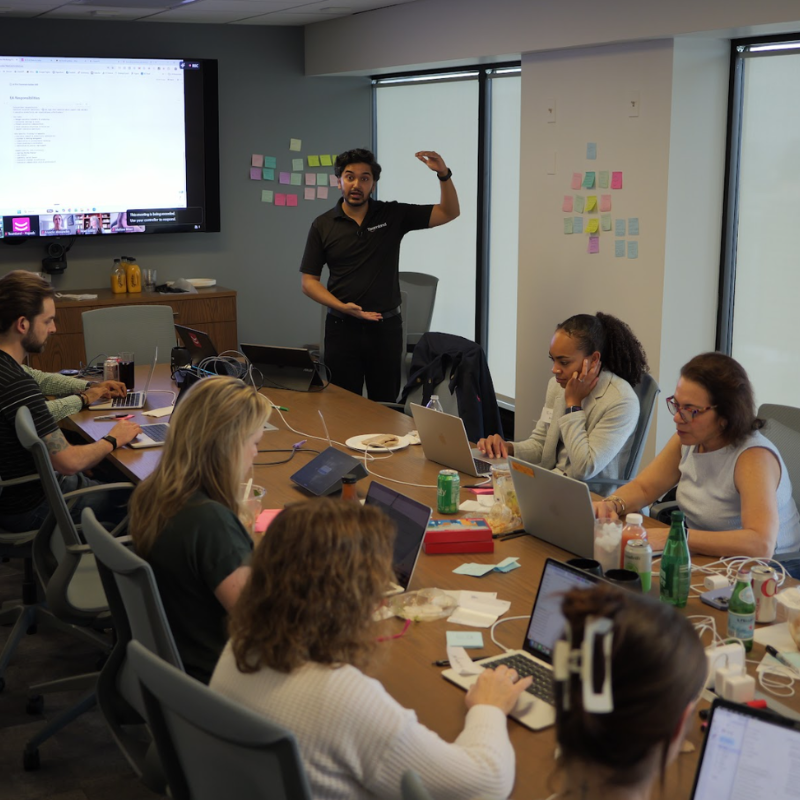
A group of executives in an AI training

What free Copilot training covers, and what it can't

Youtube videos and other free training events are well built, and they teach individuals how the features work.

Here is what self-paced feature training cannot do, because no self-paced course can:
- Map Copilot to the specific workflows your finance, sales, marketing, and ops teams run every week
- Put a cohort of your actual colleagues in one room, working on your actual files, mail, and meetings
- Answer your IT and security team's questions in the context of your tenant, your permissions, and your labels
- Measure whether adoption moved in your own usage report, and put that number in front of your executives
- Follow through at 30, 60, and 90 days so the habits survive contact with a busy quarter

Plan Your Copilot Rollout >
A group of executives in an AI training
Meet Teamland

Introducing Teamland

The ONE place for your Copilot AI First® Training
A group of executives in an AI training

How Teamland’s Copilot Training Works

1. Pre-Workshop Alignment

Discovery interviews with leadership

Mapping organizational goals to Copilot use cases across Word, Excel, Outlook, Teams, and PowerPoint

A licensing and tenant review, so the workshop trains the Copilot your people actually have

Tailoring agendas to industry, regulatory environment, and risk appetite

2. Copilot Workshop

Facilitated by Teamland's senior trainers, experienced across industries

A shared AI foundation: what Copilot is, where it pays, where it doesn't

Use cases pressure-tested against Teamland's impact–effort–risk framework

Prioritized pilots assigned to accountable owners with clear KPIs

3. Post-Workshop Roadmap

A 30/60/90 adoption plan, recap deck, and governance checklist

Optional follow-up coaching for board alignment, compliance sign-off, and scaling pilots

Why is Teamland's Copilot AI Training Unique?

Teamland is an approved recerticiation provider for SHRM & ATD
Teamland is a certified provider of ATD & SHRM. Our workshop has been independently verified.
virtual team building
We have saved 2-3 hrs per person per week on average through our previous AI workshops.
Physical on site location team building in office
We coined the term AI First in 2017,  5 years before ChatGPT.

Our Unique Methodology

The Collaborative Transformative System (CTS) is a research-backed framework designed to accelerate team performance and drive meaningful transformation at individual, relational, systemic, and performance levels.

Contact Us >

Copilot workflows we train, by role

Cohorts are built by role, and every example is calibrated to the experience in the room, from Beginner to Advanced. These are working sessions: participants leave with running Copilot workflows in their own apps, not a folder of sample prompts.
Operations and finance
Copilot in Excel for formula building, pivot analysis, and variance summaries a human verifies rather than assembles. The recurring reports that eat the first week of every month get shorter.
Marketing and communications
Word first drafts sourced from the briefs and research already sitting in SharePoint, and PowerPoint decks built from existing documents instead of blank slides.
Sales
Outlook triage and reply drafting, Teams call recaps turned into follow-ups the same hour, and account-prep briefs assembled from the mail and files you already have.
Every Role
Teams meeting recap and action-item extraction, and the "catch me up" patterns in Copilot Chat grounded in your work content, so the person who missed the meeting stops booking a second meeting about it.
Executives
Inbox triage, meeting synthesis across a week of Teams, and decision memos drafted in Word from the documents the decision actually depends on. More on AI for executives.
Get Quote >
A group of executives in an AI training applying strategy

Behind the Scenes

Every Teamland engagement runs on CTS® (Collaborative Transformative System®), the methodology behind all our delivery. Four phases:
Reveal
We baseline before we teach. The AI First Index™ pre-survey measures where your team actually stands, we pull the Copilot usage report from your admin center as the adoption baseline, we inventory the workflows each role runs, and we walk your stakeholders through the current licensing so everyone trains on the Copilot they actually have.
Design
We build the rollout around your org: role-based cohorts, exercises calibrated Beginner to Advanced, and governance alignment with your permissions, sensitivity labels, and policies.
Mobilize
The live workshops. Facilitator-led, hands-on, in your own apps and on real work (redacted or synthetic where your policies require). Cohorts leave with running workflows, not notes.
Embed
The part most training skips. Follow-through at 30, 60, and 90 days, the AI First Index™ post-measure, and an executive readout that puts adoption movement next to your own usage report, not an attendance sheet. Most recent post-workshop surveys across 500 participants and 10 workshops report a 48% boost in decision-ma
We measure adoption movement because attendance is not an outcome. The full methodology is documented at CTS®, and the flagship workshop it powers is AI First®, a mark we have held since 2017, five years before ChatGPT launched.
Get Quote >
A group of executives in an AI training

Copilot Case Study

Over 31,300 participants trained through Teamland
Client - Commvault
Challenge - The group had team members who knew AI, but the large majority of the group didn't know AI fundamentals.
Program - Full day workshop, in-person and we helped them build their own AI Executive Assistant.
"During the workshop we built an agent that streamlines our contract reviews, surfacing the right information immediately instead of hours spent scanning documents. It was built the same day, with Teamland."
- Christin M, Senior Manager Regulatory Compliance at Commvault

Trained from small companies to large enterprises
Approval & Satisfaction from our participants
Best-selling instructor and author of Innovation Books

Three ways teams work with us

Role-based cohorts learn Copilot on the workflows their jobs already run, then apply them live in the session. The core engagement.
Private 1:1 or leadership-team enablement. Your executives build their own Copilot practice, and the rollout gets the sponsorship it needs to survive the quarter.
Quarterly enablement, new workflow development, measurement, and reinforcement after launch. For teams that want the Embed phase to keep running.

Copilot governance, answered before your security team asks

The questions that stall Copilot rollouts are answerable. The ones we cover, in your context, during Reveal:
What Copilot can see
Copilot answers from what each user can already access. That means your permission model is now user-visible: a SharePoint site overshared three years ago becomes a search result today. We cover the permission-hygiene pass that belongs before any wide rollout.
Sensitivity labels and Purview
How your existing labels and data-protection policies interact with Copilot's behavior, and what to check before the first cohort.
Where your data goes
What Microsoft's published enterprise data-protection commitments cover for prompts and responses, walked through from the current published terms, not a summary of a summary.
Copilot Chat vs. paid seats
Which protections and which grounding apply to the free chat versus licensed Microsoft 365 Copilot, so nobody assumes coverage they don't have.
How Teamland works inside your rules: we can sign NDAs if needed. Workshops run on redacted or synthetic data when your policies require it. We deliver inside your approved environments and align every exercise with your governance policies.
Get Quote >
A group of executives in an AI training

GitHub Copilot for engineering teams

If you're an engineering leader who scrolled past the Excel section, this part is yours. GitHub Copilot rollouts fail differently than Microsoft 365 Copilot rollouts: the tool gets adopted fast and reviewed badly. Acceptance rate climbs while nobody agrees on what good usage looks like inside your SDLC.

A rollout that holds up needs answers to four questions before the licenses spread:
Review discipline
What does your team accept, what does it reject, and how do review standards hold when the first draft writes itself?
Tests and PR hygiene
Which patterns make AI-assisted changes easier to review instead of harder, and who enforces them?
Secure SDLC boundaries
How do secrets and sensitive context stay out of prompts, and where does Copilot usage sit inside your existing code-review and compliance gates?
Measurement past acceptance rate
Acceptance rate is an activity metric. What your leadership will ask about is cycle time, review load, and where the hours went.
Our core practice is Microsoft 365 Copilot adoption for business teams. For engineering teams, we scope GitHub Copilot enablement individually, applying the same CTS® structure: baseline first, role-calibrated working sessions, measured follow-through. Start the conversation and we'll tell you plainly what we'd deliver and what we'd refer out.
Start the Engineering Conversation >
A group of executives in an AI training

Details

Group Size:
4-200+ participants
Time:
90 mins - 5 days
Type:
Virtual or On-Site, Anywhere

Ideal For

Executives, Managers, Employees & Teams using Microsoft 365 Copilot.

Skill Level

Mixed experience levels supported, with Beginner, Intermediate, and Advanced calibration

What to do next...

When you're ready, this is the overview of the next steps
Person typing on laptop for Teamland training workshop
1. Get In Touch
We'll be quick to give you a quick no obligation quote along with more details
Woman with red jacket discussing Teamland training workshop
2. Before
We'll go through discovery calls and coordinate the logistics with your team, making any customizations needed
Person of facilitator infront of a sign
3. During
Our facilitator will seamlessly set-up the materials and deliver the training while reviewing key takeaways
Team Building Reports
4. After
We'll wrap up after the workshop including discussing any support needed for your team to be successful

What Teams Say After an AI First® Workshop

“During the workshop we built an agent that streamlines our contract reviews, surfacing the right information immediately instead of hours spent scanning documents. It was built the same day, with Teamland.”
Christin M
Senior Manager Regulatory Compliance at Commvault
Commvault logo

"Within the first 15 minutes you could see the aha moments. In a group of 12, every person across every department walked away with a new skill and a new way of thinking about AI. I'd 100% recommend Teamland."

Megan B
Director of Business Operations at Brightline

Brightline logo

"Most people think AI is just a chatbot. Teamland gave our team a real, hands-on understanding of what AI can actually do. I'd recommend them, especially for getting the fundamentals right."

Muhammad U
Senior Product Manager at Cooperators

Co-operators Logo

"Teamland gave us a clear picture of exactly how the day would run, which gave us confidence we'd picked the right partner. They were flexible and easy to work with."

Steve H
Business Controller at Alfa Laval

Alfa Laval logo

FAQs

1. What is Copilot Training at Teamland?
Copilot Training by Teamland is a facilitation-led program built specifically around Microsoft 365 Copilot, not generic AI theory. It runs organization-wide, with role-based cohorts spanning leadership, managers, and individual contributors, so every level gets calibrated exercises on the same Copilot workflows. The program prioritizes 3–5 high-ROI Copilot use cases per team and delivers a 30/60/90 adoption plan with KPIs and governance guidelines. Teams leave with materials they can act on immediately, not slide decks that sit unused.

2. Does my team need prior AI or Copilot experience?
No. The training assumes no technical background. It's built to develop practical Copilot fluency across roles, from leaders who need the strategic, risk, and governance picture, to individual contributors who'll use Copilot in Word, Excel, Outlook, and Teams every day. The focus is real use cases and techniques your team can apply the same day.

3. How is this different from other AI training programs?
Most AI training teaches generic AI concepts. Teamland's program is built around Microsoft 365 Copilot specifically, and around your actual workflows in your actual tenant. The emphasis is workflow-level adoption, governance readiness, and measurable outcomes at every level of the organization. Teams leave with prioritized Copilot pilots, adoption roadmaps, and governance structures they can action right away.

4. How long does the training take?
Sessions run from 90 minutes to 5 days, depending on cohort scope and the number of teams involved. Even in a condensed session, teams walk away with scored use cases, a draft governance model, and a pilot action plan specific to Copilot. Extended formats and ongoing coaching are available for larger, cross-functional rollouts.

5. What deliverables does my team get?
A recap deck, a prioritized Copilot pilot tracker, governance guidelines, and an adoption roadmap, formatted to plug into team playbooks and leadership updates. Teamland also provides Copilot-specific prompt libraries and compliance templates so every level of the org has practical tools for day-to-day use.

6. How soon are results seen?
Most organizations launch 2–3 Copilot pilots within the first 30 days after training. Within the first quarter, teams commonly report faster governance approval, quicker pilot selection, and more consistent Copilot usage across functions. 7. Does Teamland support long-term adoption?
Yes. Optional coaching, progress check-ins, and scaling workshops after the initial session track KPIs, expand Copilot pilots into new functions, and sustain adoption across the organization. This is the foundation for a governance-ready Copilot adoption process, org-wide.

8. We bought Copilot licenses months ago and usage is low. Where do we start?
With the usage report, not another license review. Reveal pulls your Copilot usage data as the baseline, inventories the workflows each role runs, and identifies which teams to train first. Low usage after purchase is the standard starting point for our engagements, not a special case.

9. What's the difference between Copilot Chat and Microsoft 365 Copilot?
The confusion stalls more rollouts than any technical issue. The short version: the free Copilot Chat and licensed Microsoft 365 Copilot differ in what they can ground in, and most stalled adoption traces back to people judging the paid product by the free one's limits. We walk through the current licensing during Reveal so every cohort trains on what they actually have.

10. Does Copilot expose our SharePoint data?
Copilot answers from what each user already has permission to access, which makes existing oversharing visible rather than creating new access. The pre-rollout permission-hygiene pass is part of what we cover in Reveal, alongside how your sensitivity labels apply. 11. How is this different from Microsoft's free training?
It's a different job. Microsoft Learn teaches individuals how features work, and we recommend it. We train your team on your workflows, in role-based cohorts, with governance handled in your context and adoption measured at 30, 60, and 90 days. One produces course completions. The other produces a number your executives can act on.

12. What exactly do you measure?
The AI First Index™, taken before and after the engagement, tracks adoption breadth and depth across the team, alongside your own Copilot usage report and self-reported time savings. Individuals can also take the free AI Fluency Score for a personal baseline.

13. How fast can we launch?
As fast as two weeks from signed agreement to first cohort. Those two weeks are the Reveal phase: the pre-survey, the usage-report baseline, the workflow inventory, and the licensing walkthrough.

14. Do you train GitHub Copilot for engineering teams?
Engineering enablement is scoped case by case rather than sold off the shelf. The GitHub Copilot section above covers what a sound rollout needs to answer; if that matches your situation, the form starts a scoping conversation, and we'll be direct about what we'd deliver and what we'd refer out.

Executives Love Teamland Workshops!

Plan your Copilot rollout

Tell us the team, the roles, and the timeline. You'll get a scoped recommendation for your rollout, not a generic pitch.

Trusted by Great Leaders

Expedia LogoAmazon LogoSpotify LogoDisney LogoShopify Logo

We also train teams on Claude, ChatGPT, and Google Gemini.

Teamland is an independent training provider. Microsoft, Microsoft 365, Copilot, GitHub, and GitHub Copilot are trademarks of the Microsoft group of companies. Teamland is not affiliated with, endorsed by, or sponsored by Microsoft. Trademarks are referenced solely to describe the software covered in our training programs.